
To make someone a head tenant, you need to click the actions button to the right hand side of their profile and select "make head tenant" from the list of options.
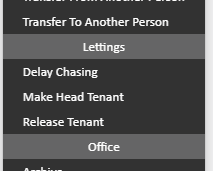
Applying head tenant status allows the rent to call solely against the one tenant which is helpful to avoid arrears being placed against any tenants at the property who are not responsible for the rent.
If the tenancy has already been created, you may have missed this step before signing and might find it difficult to assign someone as head tenant if any of the following applies to your current set-up.
1) The rent schedule dictates that rent is to be applied to another tenant at the property. If this is the case, you will need to adjust the schedule to reflect the payer as the person who is to be head tenant. Go to the tenancy > Rent Schedule on the left hand ladder > actions to the right of the schedule lines and "Set up rent breakdown"
Assign 0.00 against any tenants who are not to pay and the full rental figure against the tenant who you need to make head tenant. Now you can make them head tenant.
2) If there is a credit balance against a person on the tenancy who is not to be the head tenant. In this case, please go to the person who has money sat on their account and click actions in the top right hand side of their profile > Transfer to another person > put in the name of the person who you want to make head tenant > transfer the balance from Tenant A to Tenant B.
Now you can make the tenant head tenant.
Comments
0 comments
Please sign in to leave a comment.