
To release a tenant, please go to the Tenancy > Click Tenants on the left hand ladder:
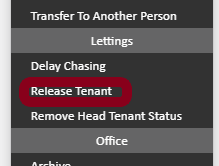
You will see the list of tenants applied to the tenancy > click actions to the right of the tenant you wish to release and select "release tenant" from the drop-down
If it does not allow you to release the tenant, please check the following factors:
1) Please ensure the rent that was applied to the tenant you wish to release is accounted for by being adjusted against the remaining tenant(s) - if you try to release a tenant who has rent responsibilities assigned to them, the system will prevent you from releasing them just in case the tenancy falls short for its required rental amount.
2) Please ensure that they are not Head Tenant Status
Comments
0 comments
Article is closed for comments.