

Features
Guarantor Agreement
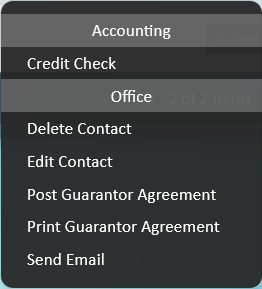
We have added a new "System Letter Template" for "Guarantor Agreement" which allows you to generate and send a tenancy agreement specifically for the chosen guarantor. The agreement is generated via "Actions" on a "Guarantor" contact, found on a tenant's record.
To add your guarantor agreement to the system, please contact our Documentation Team on documentation@agentos.com and provide a Word DocX version of your agreement.
Signable Envelopes: Edit Agreements
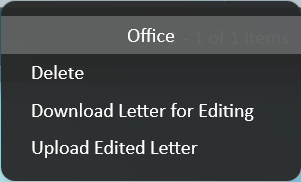
You can now edit your tenancy and guarantor agreements before sending an electronic envelope*. A new section has been added to Signable envelopes called "Letters To Sign", with two new actions "Tenancy Agreement" and "Guarantor Agreement".

When a document is added to the envelope via these two actions, use the "Download Letter for Editing" action on the letter to download a Word version of the letter. Once you have edited the document, use the "Upload Edited Letter" action to add the edited letter to the envelope.
*Via Signable ONLY.
Improvements
Electronic Envelopes: Add Recipient From Guarantor

- You can now add a Guarantor as a recipient by using the new "Add Recipient From Guarantor" action.
- Select the tenant and then choose the guarantor that you wish to add as a recipient.

Comments
0 comments
Article is closed for comments.